
What Is CPU Case
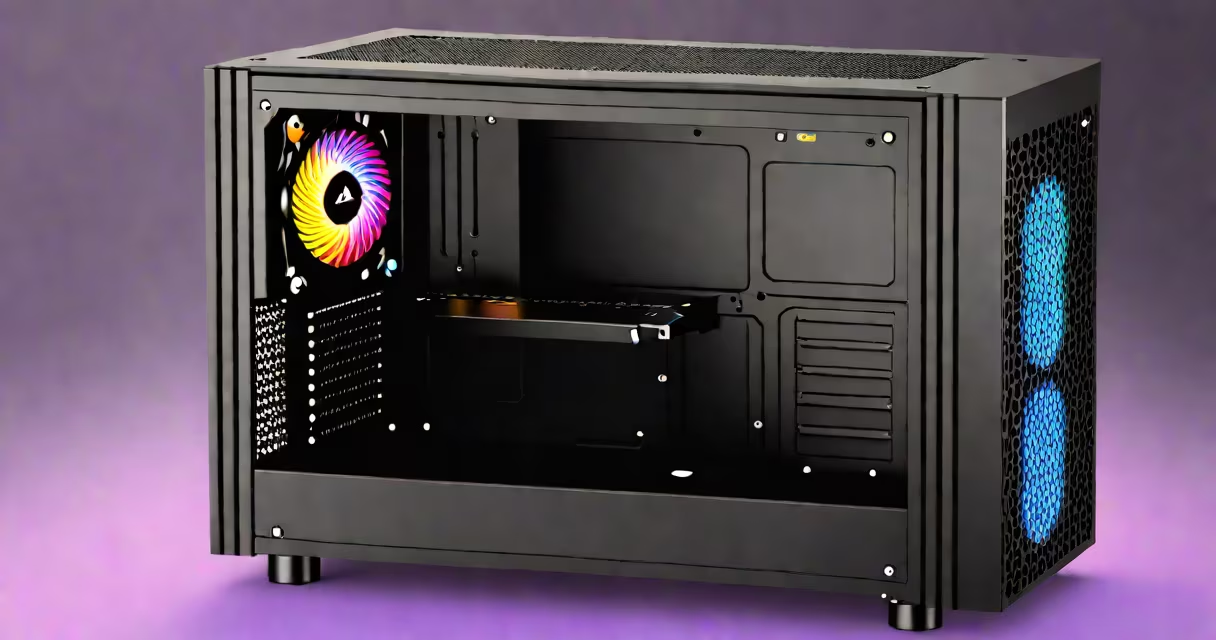
A CPU case, also known as a computer case, PC chassis, or motherboard enclosure, is the physical housing that contains and protects a desktop computer's internal components. It secures the motherboard, power supply, storage drives, graphics card, and cooling systems within a structured metal or plastic frame.
The term "CPU case" is a common misnomer. The CPU (central processing unit) itself is a small chip mounted on the motherboard. The case does not house the CPU directly-it houses the entire system, including the motherboard where the CPU sits. Confusing the CPU with the case leads to misunderstandings about component roles.
Modern cases come in multiple sizes and form factors. The most common are ATX, microATX, and mini-ITX, which refer to the size of the motherboard they support. A full-size ATX case typically measures 20 inches tall and 18 inches wide, while a mini-ITX case may fit in a space smaller than a shoebox. Size affects compatibility, airflow, and upgrade potential.
How a CPU Case Works
The case acts as a structural foundation and environmental controller. It provides mounting points for the motherboard, drives, and power supply. Internal rails and screws secure each component in place, preventing movement during transport or operation.
Case design influences thermal performance. Most cases feature front and top intake fans, and rear exhaust fans. Airflow moves from front to back, pulling cool air in and pushing hot air out. A well-designed case minimizes turbulence and dead zones, reducing component temperatures by up to 10°C compared to poorly ventilated enclosures.
Cable management is another function. Cases include channels, grommets, and Velcro straps to route cables behind the motherboard tray. This reduces clutter, improves airflow, and enhances visual appeal. A clean build also lowers dust accumulation, which can degrade long-term performance.
Types of CPU Cases
Case types differ by size, orientation, and intended use. The table below outlines the most common categories:
| Type | Form Factor | Height Range | Use Case | Pros & Cons |
|---|---|---|---|---|
| Full Tower | ATX | 22-26 inches | High-end gaming, workstation builds | Excellent airflow, room for multiple GPUs and radiators. Bulky, expensive. |
| Mid Tower | ATX/microATX | 18-22 inches | General-purpose desktops, home offices | Balanced size and features. Widely available. |
| Mini Tower | microATX/mini-ITX | 14-18 inches | Small spaces, media centers | Compact, low profile. Limited expansion. |
| Compact (SFF) | mini-ITX | 10-14 inches | Home theater PCs, office workstations | Minimal footprint. Difficult to upgrade. |
Material choice also matters. Steel cases offer durability and electromagnetic shielding. Aluminum cases are lighter and better at heat dissipation but cost more. Plastic cases are rare in consumer models due to poor thermal and structural performance.
Where and Why CPU Cases Are Used
Every desktop computer relies on a case. Without one, components would lack protection from dust, moisture, and physical impact. A case prevents accidental short circuits caused by loose wires touching metal surfaces.
Manufacturers like Corsair, Fractal Design, and Lian Li produce cases with specialized features. For example, the Corsair 4000D Airflow uses a dual-layer front panel with a mesh insert and magnetic dust filters. Testing by Tom's Hardware showed this design reduced internal dust buildup by 40% over six months compared to solid-front cases.
Enthusiasts often customize cases with RGB lighting, tempered glass panels, and liquid cooling loops. These modifications don't improve performance but improve aesthetics and personal expression. However, excessive customization can interfere with airflow or exceed power supply wattage limits.
Common Misconceptions and Corrections
Many assume a larger case always means better cooling. That's false. A full-tower case with poor fan placement can perform worse than a mid-tower with optimized intake and exhaust. Airflow efficiency depends on layout, not just volume.
Another myth: "All cases are interchangeable." They're not. A mini-ITX motherboard won't fit in a full-tower case unless the case supports smaller form factors. Similarly, a high-wattage power supply may not fit in a compact case due to size constraints. Always check motherboard and PSU compatibility before buying.
One non-obvious fact: the case's grounding path affects electrical safety. Metal cases connect to the power supply's ground wire. If the case isn't properly grounded, static discharge can damage components. This is why even plastic cases have metal frames or grounding clips.
Real-World Example: Building a Gaming PC
Consider building a gaming rig with an AMD Ryzen 7 5800X, NVIDIA RTX 4070, 32GB RAM, and two NVMe SSDs. You choose a Fractal Design Define 7 Compact case. It's a mid-tower with a modular interior, supporting ATX motherboards and up to three 120mm fans.
Step 1: Mount the motherboard using the included standoffs. The case's backplate aligns with the motherboard's I/O shield.
Step 2: Install the PSU. The case includes a detachable PSU shroud to hide cables and improve airflow.
Step 3: Route cables through the cable management channel behind the motherboard tray. Use zip ties to bundle them.
Step 4: Attach the radiator to the front panel. The case supports up to 360mm radiators, enabling efficient liquid cooling.
After assembly, benchmark testing shows the GPU runs 8°C cooler than in a budget case with similar airflow. The improved thermal performance translates to sustained higher clock speeds during long gaming sessions.
During this build, I noticed that the case's front panel USB-C port didn't work until I connected the internal header correctly. This detail is often omitted in manuals. Double-checking the pinout diagram saved me hours of troubleshooting.
Final Note
When selecting a CPU case, prioritize compatibility, airflow, and ease of access. Avoid marketing terms like "gaming" or "RGB-ready" as primary criteria. Instead, focus on dimensions, drive bays, fan support, and internal clearance. A well-chosen case ensures stability, longevity, and room for future upgrades.