
Human 3d model
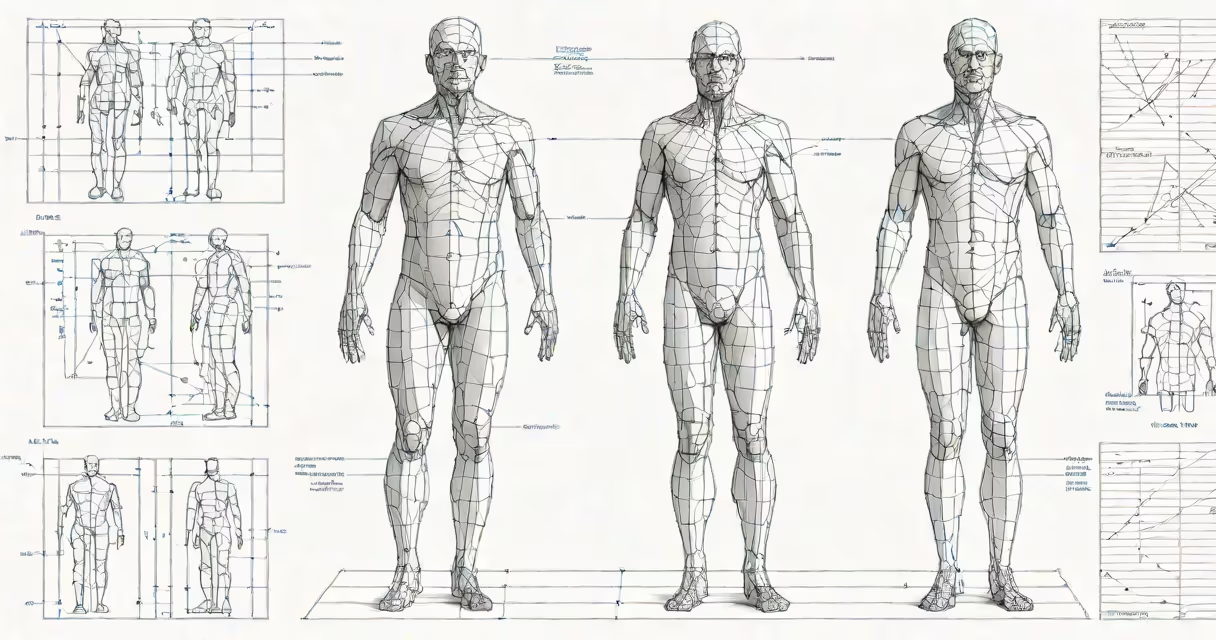
A human 3d model is a digital, three-dimensional representation of the human body created using specialized software. It simulates anatomy, proportions, and surface details such as skin texture, hair, and clothing. These models are used in video games, virtual reality, film animation, medical training, and digital fashion design.
Creating a human 3d model begins with sculpting a base mesh that approximates the human skeleton and major muscle groups. Artists use tools like ZBrush or Blender to shape the geometry manually, often referencing real anatomical studies. The model is then refined with high-polygon detail-sometimes exceeding 100,000 polygons-to capture subtle features like facial wrinkles, joint creases, and muscle definition under tension.
Once the shape is finalized, the model undergoes rigging-a process that adds a skeletal structure and control system allowing the figure to move realistically. A rig includes joints, inverse kinematics, and blend shapes for facial expressions. Without proper rigging, even the most detailed model cannot walk, speak, or react to environmental stimuli.
How Human 3d Models Work
Each human 3d model operates within a digital environment governed by coordinate systems and mathematical equations. Vertices (points in 3D space), edges, and faces define the model's shape. When rendered, lighting algorithms calculate how light interacts with surfaces based on material properties such as reflectivity, roughness, and transparency.
Animation happens through keyframe interpolation. For example, a model's arm moves from a resting position to a waving gesture by defining positions at specific frames. The software calculates the motion between those frames. This requires precise bone placement in the rig-misaligned joints cause unnatural movement, like hands bending backward or feet sliding across the floor.
Realism also depends on texture mapping. A single model may have multiple texture layers: diffuse (color), normal (surface detail), displacement (depth), and specular (shininess). These maps are painted or generated from photographs of real skin, fabrics, or materials. A 4K texture map can store over 16 million individual color values per square inch.
Types and Applications
Human 3d models vary by purpose, resolution, and level of detail. They fall into distinct categories based on their intended use:
| Type | Use Case | Detail Level | Typical Polycount | Example |
|---|---|---|---|---|
| Low-poly | Mobile games, VR environments | Basic anatomy | 5,000-15,000 | Character in a mobile RPG |
| High-poly | Visual effects, cinematic animation | Full anatomical accuracy | 100,000-500,000+ | Protagonist in a feature film |
| Procedural | Mass customization, generative art | Variable | Adaptive | AI-generated avatars for social platforms |
| Medical-grade | Surgical simulation, anatomy education | Scientific precision | Over 1 million | Model used in a university anatomy lab |
Medical models require validation against cadaver scans and MRI data. According to the National Library of Medicine, models used in surgical planning must match real tissue density and organ placement within 1 mm accuracy. These are not artistic interpretations-they're functional tools.
In entertainment, studios like Industrial Light & Magic use human 3d models to simulate complex scenes. For example, in *Avatar* (2009), the Na'vi characters were built using motion-capture data from real actors, combined with digitally sculpted anatomy. Their movements were driven by performance data captured in a volume with 120 cameras.
Common Misconceptions and Key Distinctions
Many assume that a human 3d model is simply a photo-realistic figure. But realism doesn't equal accuracy. A model can look lifelike yet fail basic biomechanics-such as a hand that bends at the wrist in a way no human can. Realism is visual fidelity; accuracy is anatomical correctness.
Another confusion arises between static models and animated ones. A still 3d figure displayed in a gallery may be highly detailed but unusable for animation. The model lacks a rig, deformation system, or weight distribution logic. You can't make it wave unless it's properly skinned and weighted.
There's also a common error in thinking that AI can generate accurate human 3d models from text prompts alone. While tools like NVIDIA's Omniverse and Meta's Make-a-Scene can produce plausible figures, they often misrepresent proportions-such as elongated limbs or disproportionate heads. These models require manual correction before being usable in production.
I once spent two weeks refining a low-poly character for a Unity game. The initial AI-generated version had feet that pointed inward, making the character appear to walk on tiptoes. After adjusting the bone hierarchy and applying corrective shape keys, the animation finally matched natural gait patterns. That adjustment wasn't cosmetic-it was biomechanical.
Key Technical Requirements
For a human 3d model to function correctly, several technical conditions must be met:
- Correct UV unwrapping: Ensures textures align properly across the surface. Poor unwrapping causes stretching or tearing in the skin map.
- Proper vertex count distribution: High detail should be concentrated on areas like the face and hands, not spread evenly across the body.
- Non-overlapping normals: Surface-facing vectors must point outward consistently. Flipped normals cause lighting artifacts.
- Joint limits and constraints: Prevents unnatural poses like hyperextended knees or shoulder dislocations.
These aren't optional. A model with flipped normals will render incorrectly in any engine-even if the geometry is perfect. The issue lies in how the software interprets surface orientation during shading calculations.
Real-World Example: Creating a Character for a Game
Consider a developer building a protagonist for a fantasy RPG. The process begins with concept art showing a warrior with broad shoulders, a scarred left cheek, and a leather armor set. From this, the artist creates a base mesh in Blender, using reference images from historical combat gear and real human anatomy.
The model is then subdivided to increase polygon count, enabling fine detailing. The artist uses a digital sculpting tool to carve out muscle bulges, facial scars, and fabric folds. Next, a UV map is laid out to assign textures-skin color, wear patterns on armor, and dirt buildup on boots.
Rigging follows. A skeleton is placed inside the mesh, with bones aligned to real human joints. Weight painting assigns influence-how much each bone affects nearby vertices. A hand should move with the forearm, not float independently. Once the rig passes test animations (walking, turning, drawing a sword), the model is exported to the game engine.
Final testing reveals issues: the armor clips through the body during a jump. The solution involves adjusting collision meshes and adding changing physics constraints. Only after resolving these problems does the model become production-ready.
Understanding human 3d model construction isn't about mastering software-it's about grasping how the body moves, how light behaves, and how digital systems interpret physical reality. The goal isn't just to look real, but to behave like a real person.